
Voting
1 How to vote
For all documents with a formal vote (NP, CDV, FDIS, DTR, DTS, DPAS, DISH, etc.), the vote should be cast directly in the IEC Electronic Voting system by using the "Vote" page.
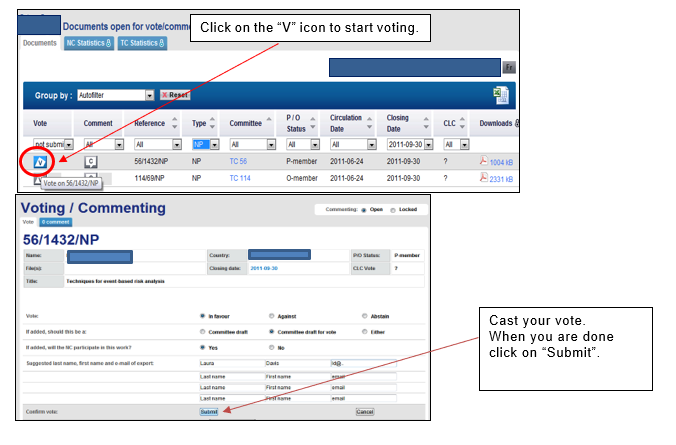
The latest vote for a document will overwrite any previously submitted vote.
If you vote Against, you shall include a justification statement in the field. You can also upload a comment file, if needed. These will differ by the type of vote, for example:
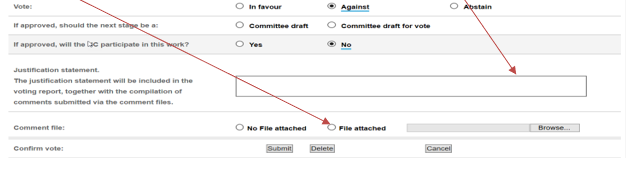
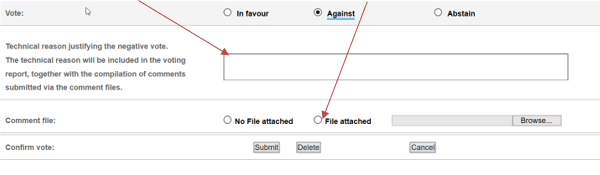
If you wish to reset your vote and/or comment, click on Delete. This will clear all the previous vote and comment on the document.

2 Email notifications
Each time a vote is cast, an e-mail will be sent to the Voter who cast the vote.
Each time a comment form is uploaded (for non-OSD projects), an email will be sent to the Voter who uploaded the file. Every 30 minutes, the voting system runs a check on the files which are uploaded. Once the system has checked the comment file, it sends one single email to the Voter informing them whether the file has been accepted or rejected. Except for some governance votes where notifications are sent immediately.
For documents without formal vote, each time the commenting option called “No comment at this stage” is selected, an email will be sent to the person who selected this option.
For all the authorised persons having voting/commenting rights, a "Summary" email containing a list of all "documents open for vote/comment" closing in the next 42 hours and showing the vote and/or comment already cast by the NC is sent out on Thursday mornings (before 6:00 CET).

Only those comment files or validated OSD comments which have been submitted by the closing date will be included in the final table of comments.