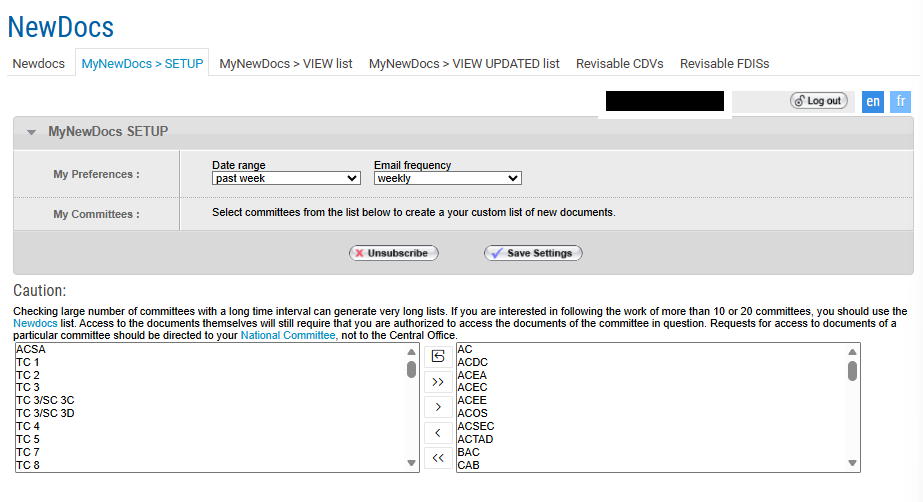
NewDocs allows you to subscribe to newly circulated documents.
Please note that some documents will be emailed direct to you or released elsewhere, for example, working group documents are typically shared on the Collaboration Platform.
1 Accessing NewDocs
-
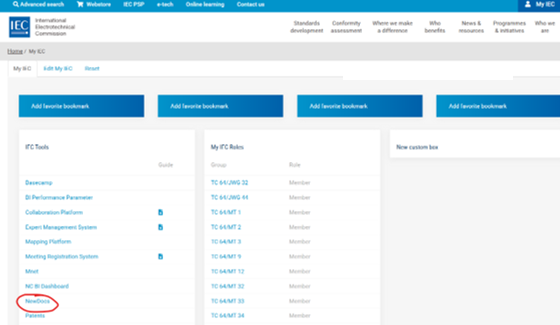
From the IEC Homepage (iec.ch) select My IEC.
-
From the My IEC menu, select DashBoard.
-
From the dashboard list, select NewDocs:

2 Setting up “MyNewDocs” alerts
-
In NewDocs, select MyNewDocs > SETUP.
-
Select your preferred Email frequency.
-
Follow documents (e.g. from TCs, PCs, etc.) by moving them from the left to the right and then Save settings: