
1 Turning on content quality check
-
The "Quality check" is turned off by default, it can be turned on from the TOOLS menu or from the bubble menu:

-
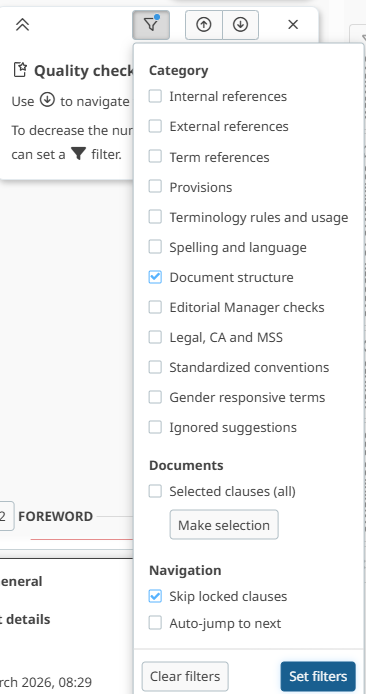
The content quality check tool continues to be refined and includes checks for categories including:
Please note
-
Content quality options are JIT (Just in time) compatible, ensuring that it is activated for the entire document and not just for currently loaded clauses.
-
Content quality checks, based on ISO/IEC Directives, include:
-
Detection of words: may, should, and shall in the Scope clause.
-
Detection of incorrectly written cross references to tables, figures, and equations.
-
Detection of incorrectly written bibliography and normative references.
-
Detection of incorrectly written definition in Terms and definitions clause, following Directives part 2.
-
Grammatical and Spell check as per English (UK).
-
Rules to detect terms not yet cross referenced in the publication.
-
Rules based on ISO/IEC dictionaries for pattern recognition.
-
Document structure checks, including for mixed lists (combining numbered and unnumbered elements), empty paragraphs and extra spaces in a row.
-
2 Turning off content quality check
-
Quality content check can be turned off from the TOOLS menu or the bubble menu:

3 Quality check on a section of the document
-
You can do a quality check on just a section of the document.
-
To do so you can go into the quality check filters and click on Make selection:

-
You will then see the pop-up below in which you can select the sections you would like to do a quality check on (they will appear with checks beside them).
-
Once you have made your selection you can click on Apply to start the check on these sections.

4 Ignoring content quality suggestions
Editors can ignore, one by one, the content quality suggestion when reviewing the document.