For TC/SC meetings (including WGs), shortcuts for creation of meetings are available in each workspace of the IEC Collaboration Platform.
For all meetings in MRS the details can be completed via the tabbed interface which also includes management features:
Regarding hosting TC/SC plenary meetings, the host NC is responsible for completing the required meeting information (timetable, visas, etc.):
Details tab
Registration dates and other information can be entered direct into the relevant fields:
General Meetings and some other events require a Timetable start date prior to the Official start of the event/meeting.
Meetings (Timetable) tab
For TC/SC plenary meetings, the Host Committee’s assigned organizer will add the timetable of meetings.
Adding and editing meetings in an MRS timetable
-
Add a meeting for each meeting as required:
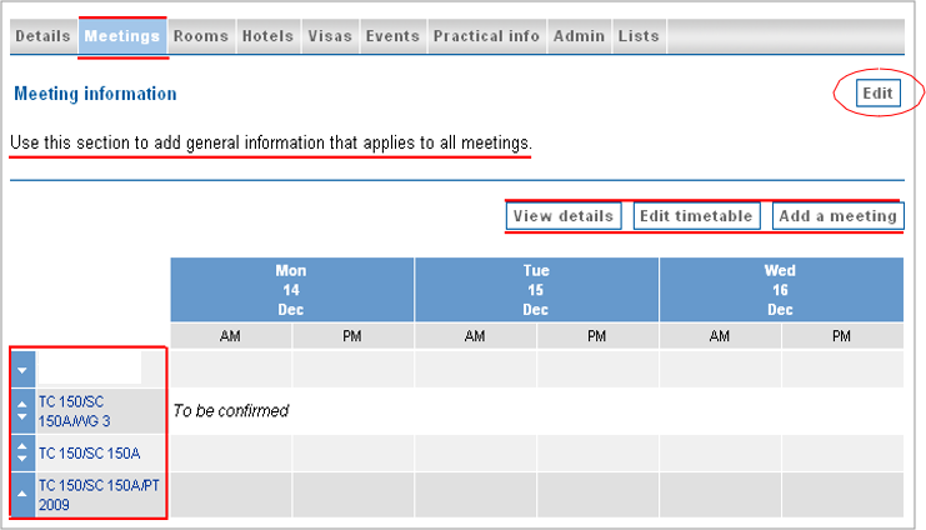
To view, edit or delete component meeting, select the meeting from the submenu
The Meeting type field determines a number of the other settings, including accreditation and registration rules.
-
Edit timetable can be used for information that applies to all meetings.
Changing between timetable and list views for meetings in MRS
-
View details changes the user interface to a list view (rather than the timetable), for example:
-
View rooms allows for seeing in which rooms the meetings are taking place.
Rooms tab
Creating rooms, including building and room number/name for clarity, allows them to be attached to the relevant meeting records.
Room information is not compulsory but can help the host organize the logistics of the meeting.
If a room is already assigned to a meeting, it can still be edited but not deleted:
Hotels tab
Hotel information is not compulsory, but it is recommended as useful information for participants. If information is available in other formats, such as documents, it can be added to the Practical info tab.
The HC Organizer should return and update this section as required, for example indicating that the hotels are full if that is known. They can add hotels and links as required, fill in other details (such as URL) and add room information:
Visas tab
Some participants may need visas to attend meetings. Click Edit and add a check mark to countries that require visas as a reminder to potential participants:
If information is in other formats, such as documents, it can be added to the “Practical info” tab.
Accompanying persons are subject to the same visa requirements. It is therefore essential that the information fields are properly filled out, for both participants AND accompanying persons (when relevant).
Under the Admin tab’s Invitation letters option, you will find an Excel file extraction option for the HC to merge the data with a Word file for invitation letters:
Events tab
Additional event details can be added here in a similar way to the timetabled meetings.
Additional workshops, offsite events, and other items can be added here or as part of the Timetable.
Practical info tab
Three sections are available to provide additional information: Practical information, general Documents, and Meeting/Event Documents:
Edits to Practical information should concern elements which may facilitate the visit and make it more agreeable, such as information about currency, public transport, the weather, security, local customs, voltage and sockets, locations, maps, etc.
Please post relevant information for participants under “Documents”, this should relate to the registration or events.
For participants, other documents will be shared via relevant dashboards or Collaboration Platform.