
Accessible only to administrators designated by each National Committee to manage OSD local settings.
The Online Standards Development (OSD) platform allows to define customized XML content templates for specific sections of a document.
The Custom XML Templates administration feature provides a flexible way to customize the initial XML content used for document sections.
Administrators can:
-
select the section to customize;
-
review the default XML template;
-
create custom templates;
-
target templates by document type;
-
target templates by language;
-
combine document type and language for more specific configurations;
-
rely on the default template when no applicable customization exists.
1. XML Sections
Custom XML templates can be configured independently for each supported XML section.
Each section represents a specific structural component of the document.
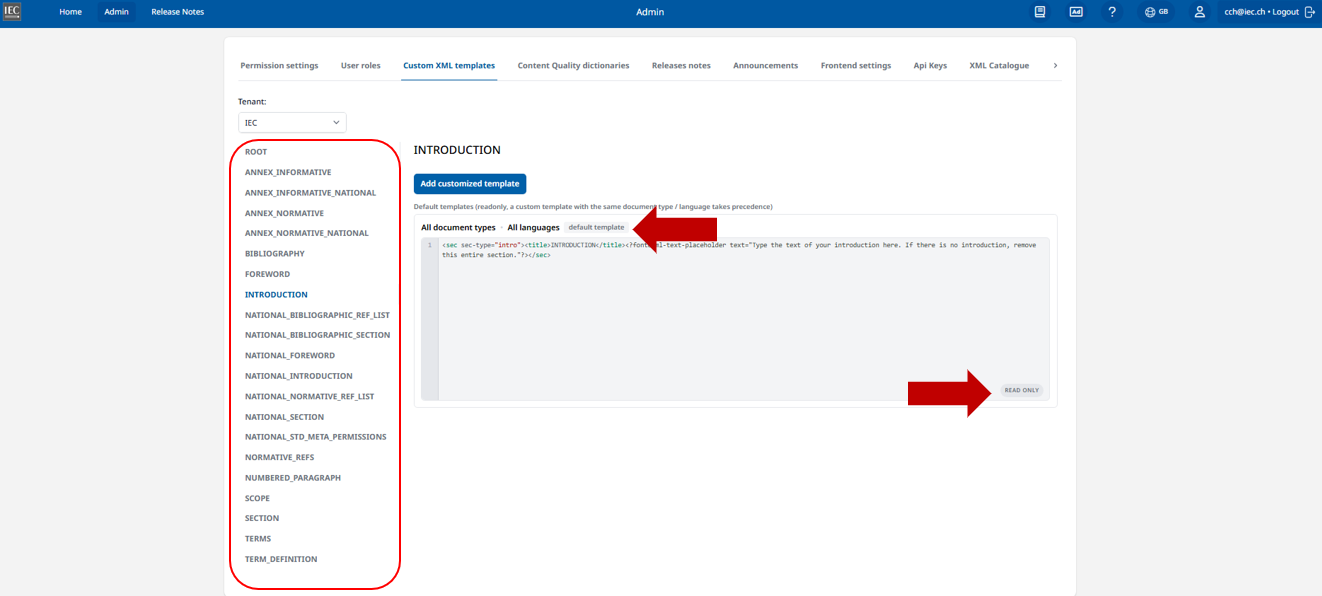
The following sections are currently available for customization:
|
XML section |
Description |
|---|---|
|
ROOT |
Defines the root structure of the XML document and the main elements that may be initialized when a document is created. |
|
ANNEX_INFORMATIVE |
Defines the initial XML structure for an informative annex. |
|
ANNEX_INFORMATIVE_NATIONAL |
Defines the initial XML structure for a national informative annex. |
|
ANNEX_NORMATIVE |
Defines the initial XML structure for a normative annex. |
|
ANNEX_NORMATIVE_NATIONAL |
Defines the initial XML structure for a national normative annex. |
|
BIBLIOGRAPHY |
Defines the XML structure used to initialize the bibliography. |
|
FOREWORD |
Defines the initial structure and content of a foreword. |
|
INTRODUCTION |
Defines the initial structure and content of an introduction. |
|
NATIONAL_BIBLIOGRAPHIC_REF_LIST |
Defines the structure used for a list of national bibliographic references. |
|
NATIONAL_BIBLIOGRAPHIC_SECTION |
Defines the initial structure of a national bibliography section. |
|
NATIONAL_FOREWORD |
Defines the initial structure and content of a national foreword. |
|
NATIONAL_INTRODUCTION |
Defines the initial structure and content of a national introduction. |
|
NATIONAL_NORMATIVE_REF_LIST |
Defines the structure used for a list of national normative references. |
|
NATIONAL_SECTION |
Defines the initial XML structure of a national-specific section. |
|
NATIONAL_STD_META_PERMISSIONS |
Defines the XML structure related to permissions information in the national standard metadata. |
|
NORMATIVE_REFS |
Defines the structure used to initialize the normative references section. |
|
NUMBERED_PARAGRAPH |
Defines the initial XML structure for a numbered paragraph. |
|
SCOPE |
Defines the initial structure and content of the scope section. |
|
SECTION |
Defines the generic XML structure used when initializing a standard document section or clause. |
|
TERMS |
Defines the initial structure of the terms and definitions section. |
|
TERM_DEFINITION |
Defines the XML structure used when creating an individual term and its definition. |
2. Default templates
For each section, the system provides a default template.
The default template is displayed as read-only and cannot be modified from this screen.
It acts as the fallback template when no more specific custom template exists for the current document type and language.
3. Customized templates
-
To create a new template
-
In the left-hand panel, select the section for which you want to customize the XML content.
-
Click Add customized template.
-
Select the Document type to which the template should apply.
-
Select the Language to which the template should apply.
-
Enter or adapt the XML content for the selected section.
-
Save the template.
-
The custom template will then be associated with the selected section, document type and language.
For example, an administrator could configure:
-
a custom SCOPE template for English International Standards;
-
a different SCOPE template for French International Standards;
-
a custom TERMS template applicable to all languages;
-
and keep the default templates for all other sections.
This provides granular control over the XML structure while limiting customization to the areas where it is actually required.
-
XML schema validation
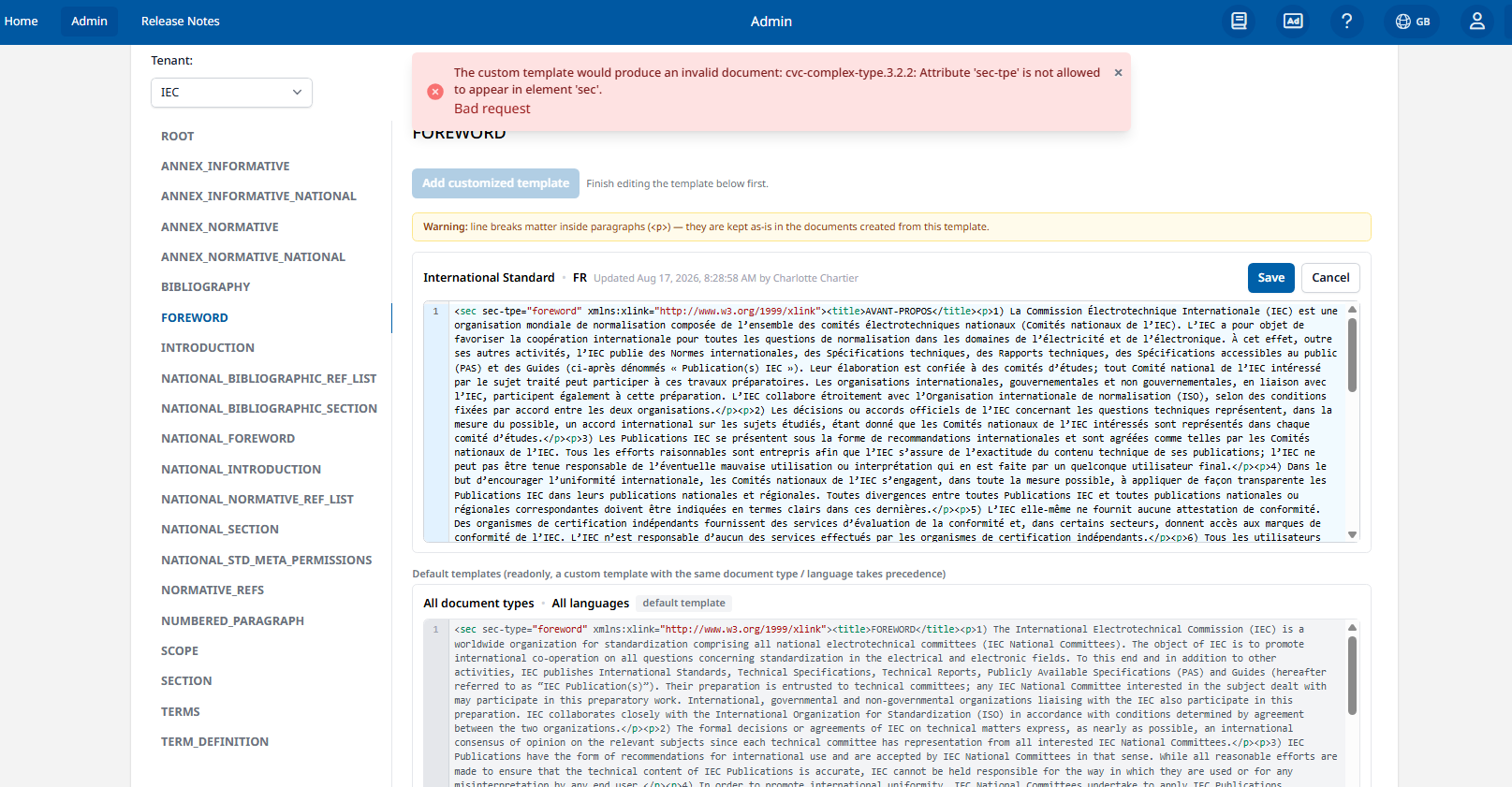
Before a custom XML template is saved, its content is validated against the NISO-STS XML schema to ensure that the generated document remains compliant with the expected XML structure.
If the template contains invalid elements, attributes, or structures, it cannot be saved. An error message is displayed at the top of the screen, indicating the validation issue and helping the administrator identify what needs to be corrected.
For example, if an attribute is not allowed on a specific XML element, the validation message identifies both the affected element and the invalid attribute.
The XML must be corrected and successfully validated before the custom template can be saved.
The default template displayed for each section should be used as the reference structure when creating a customized template.
-
When Template Updates Take Effect
The latest version of a custom XML template does not necessarily apply to all existing projects. This depends on when the corresponding section is initialized or generated.
Some sections are initialized when the project is created. For these sections, the latest template available at the time of project creation is used. Any subsequent changes to the template will not be automatically reflected in existing projects. For example, Normative References are initialized at project creation; therefore, updating the NORMATIVE_REFS template will only affect projects created after the update.
Other sections are generated or initialized directly during project authoring (TERM_DEFINITIONS for instance). For these sections, the application retrieves the latest applicable version of the template at the time the section is created. As a result, template updates can also apply to existing projects, provided that the corresponding section has not yet been created.