
Adding comments
Hit the speech bubble-shaped button next to the translation box. It will open the comment section corresponding to the string, where you can share your comment with the team or view the comments made by other team members.

Marking Fuzzy translations
Marking a translation as Fuzzy signals it needs revision. The most common use cases are described.
Translations tagged as Fuzzy are not imported into OSD, for the sake of accuracy.
Automatic Fuzzy
If a translation does not follow POEditor syntax and needs review or changes, it is marked as Fuzzy. A warning sometimes appears.

Complex labels, such as the example below, are more prone to syntax and formatting errors.
{numberOfResults, plural, =0 {no errors} 1 {1 error} other {{resultIndex, plural, =0 {{numberOfResults} errors} other {{resultIndex} of {numberOfResults}}}}}
The ICU Editor feature can help during translation.
Manual Fuzzy
Hit the F button to Toggle a Fuzzy Translation. In any language, next to the translation box, this function can be used to let team members know that the translation needs to be revised.

Tracking progress
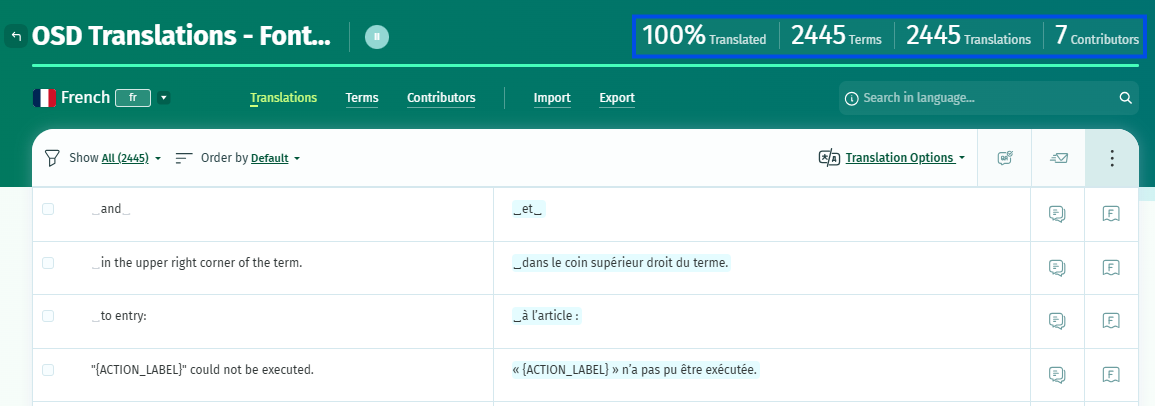
POEditor displays information for each project, including:
-
Percentage of translated terms
-
Total number of terms
-
Total number of translated terms
This would help identify some areas to work on. Then the Searching and filtering option would also help to find translated or not translated terms.
Communicating to IEC that new translations are available
If translated terms exceed 70%, you do not need to inform IEC that the labels were translated.
Several times a day, OSD checks for newly published versions in your language and loads them automatically for being applied in the relevant instance(s).